 AI

Cursor
A strong agentic code editor that is now sold inside The X Subscription, so a team seat also buys Grok and a verified badge whether you wanted them or not.
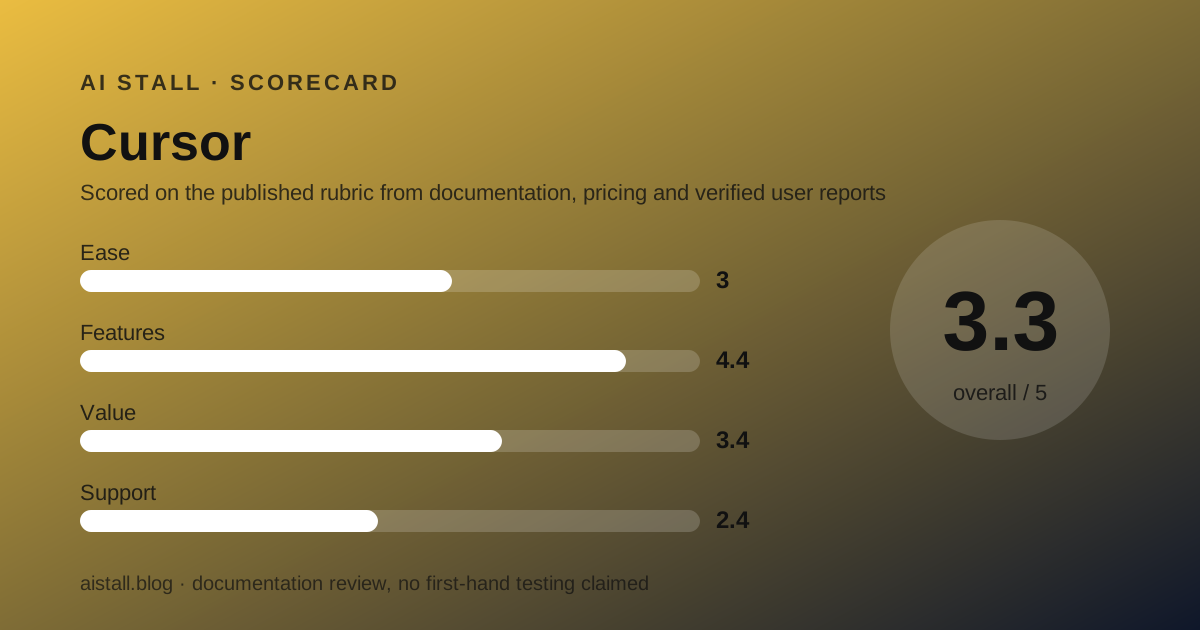
Scored on the published rubric, from documentation, pricing and verified user reports.
Best for: Small teams who want the agent to be the editor rather than a panel inside one, and who can live with a seat price, a weekly usage pool and a shared prepaid balance all moving at once.
Verdict
This is a documentation review built from the Cursor pricing page, four Cursor documentation and help pages read in their published markdown form, and the public Trustpilot profile, all checked October 22, 2026. No account was created for this page.
The product is strong and the commercial arrangement is the story. Cursor is now sold as part of The X Subscription, described on the vendor's own help page as one subscription for Grok, Cursor, and X.
That is not a marketing flourish. The pricing page footer reads Anysphere, Inc., the page states that subscriptions are only sold directly through X Subscription Corp, and the team docs send admins to grok.com/dashboard to read their usage and grok.com/dashboard/billing to manage credit.
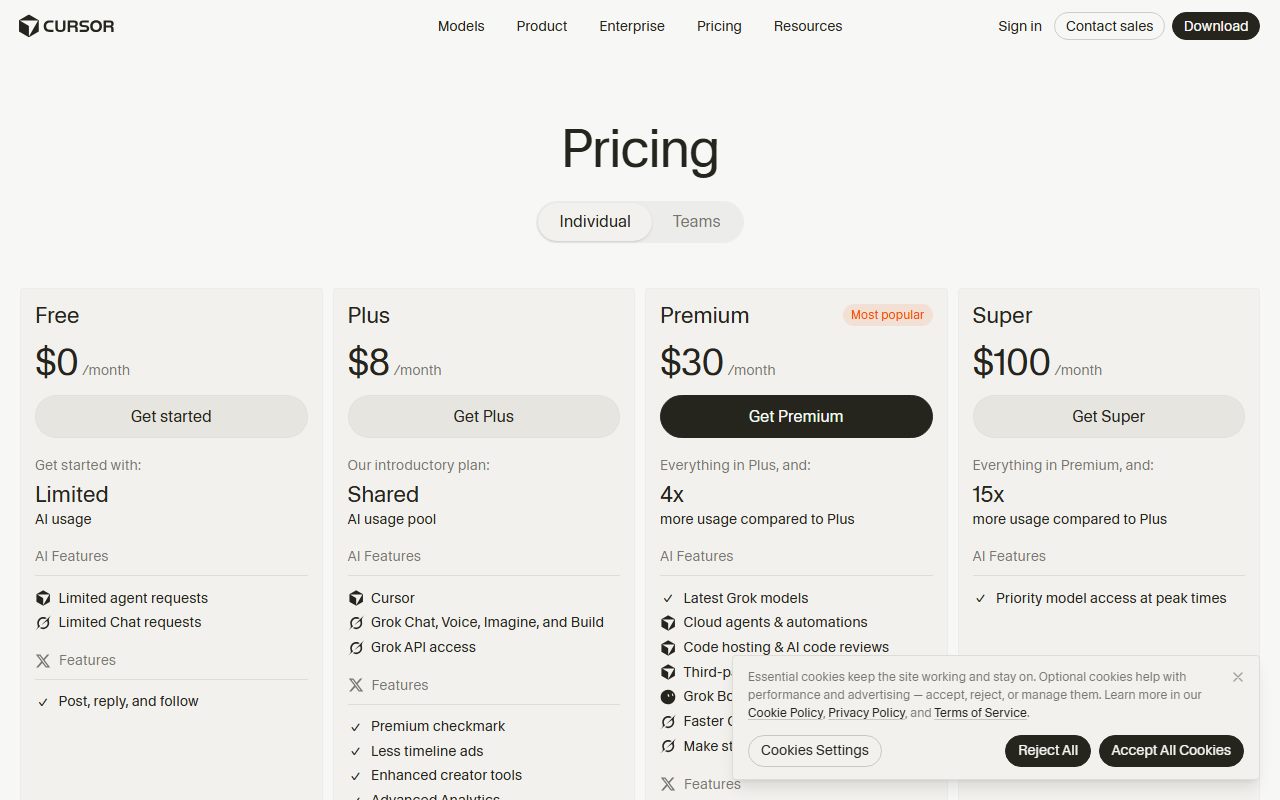
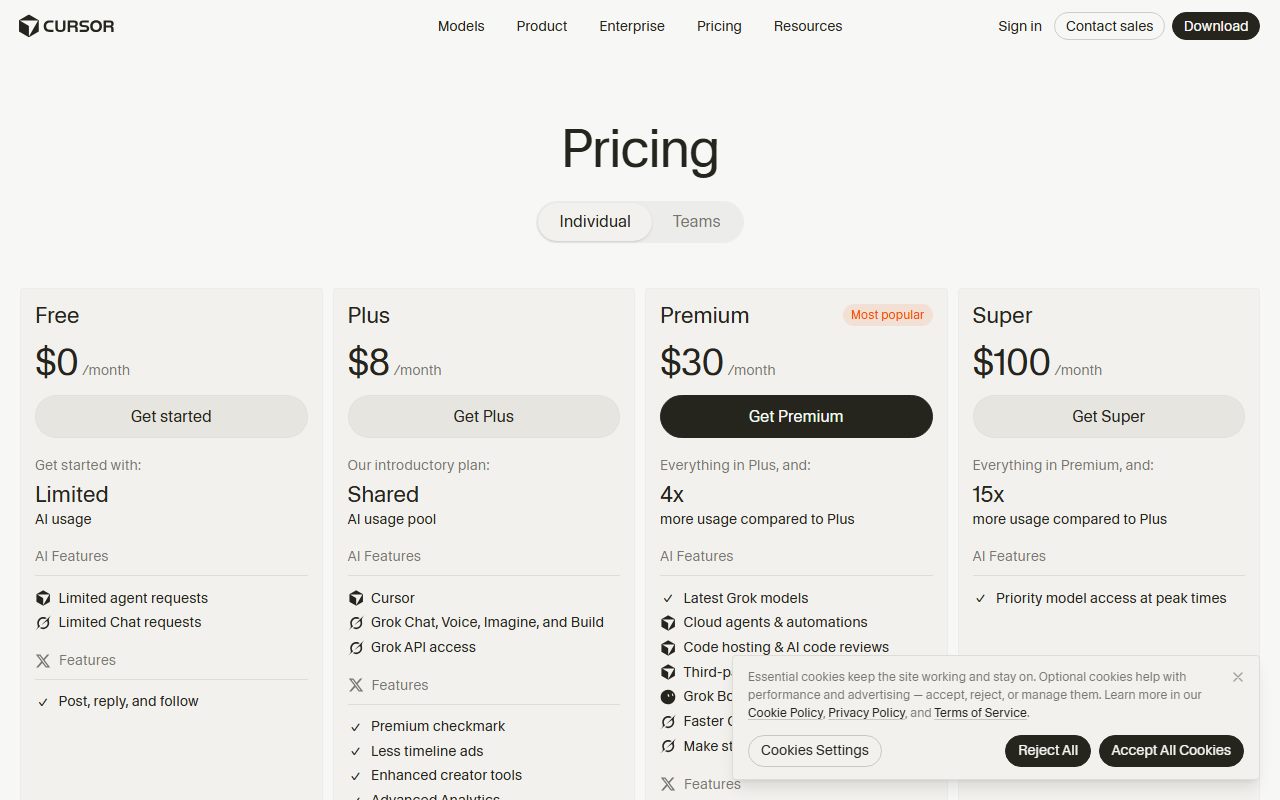
For a team the seats are Premium at $30 a user a month, Super at $100 and Ultra at $200, plus a $0 Free seat that carries no team allowance. Plus is not available to teams.
The seat buys a weekly pool of usage for Cursor's own models, which are the Grok family and Composer. Third-party models are not included: they are billed at public list API prices from the first request, paid from a prepaid balance the whole team shares.
Teams and Enterprise also pay a Cursor Token Rate of $0.25 per million tokens on eligible third-party requests, applied to input, output and cached tokens. Individual plans do not pay it.
Two more things a buyer should know. Pooled usage across the team is an Enterprise feature, not a Teams one, so on Teams each seat's weekly pool is its own. And priority support, invoicing, SCIM and audit logs are all Enterprise only.
Visit Cursor
We have no affiliate relationship with this vendor. Link goes to the official site.
Where it is strong
- The team price is published in full, with three seat tiers and a free one: Premium $30, Super $100, Ultra $200 and Free $0 a user a month, per the team pricing documentation checked October 22, 2026
- Seat tiers can be mixed. The docs state seat tier is separate from role and give an example of three Premium seats and one Super seat on the same team
- Billing follows people, not licences: the docs state Cursor bills per active user, not seats, and that new members are charged pro rata for their remaining time
- Annual billing is published for the individual plans at $80 a year for Plus, $300 for Premium, $1,000 for Super and $2,000 for Ultra, which is ten months of the monthly price on each tier by our arithmetic
- Privacy mode is a stated guarantee rather than a setting: the pricing page says when it is enabled, code data is not used for training by Cursor or its model providers, and it can be enforced team-wide by an admin
- The usage pool refreshes weekly rather than monthly, which the vendor frames as stopping one heavy day from using up the month
Where it falls short
- A team seat now buys social features nobody asked an engineering budget for. The feature comparison on the pricing page lists a premium checkmark, ad-free scrolling, reply boost, a preferred handle and Media Studio on the Teams column
- Third-party models are excluded from the seat price. The pricing page states that third party model usage in Cursor is not included in the monthly prices shown and must be purchased separately
- Teams and Enterprise pay a Cursor Token Rate of $0.25 per million tokens on top of model API pricing for eligible third-party and BYOK usage, applied to input, output and cached tokens. Individual plans do not pay it
- Pooled usage is Enterprise only. On Teams the docs state seats do not share weekly pools with each other and usage does not transfer between team members
- Priority support is Enterprise only per the pricing page comparison, and no response time target is published for Teams
- Trustpilot shows cursor.com at 1.5 out of 5 from 349 reviews as of October 22, 2026, with 80 percent at one star, on an unclaimed profile
- There are now two generations of plans in circulation. Legacy Pro at $20, Pro+ at $60, Teams Standard at $40 and Teams Premium at $120 a user a month continue for existing customers and are closed to new ones
At a glance
| Pricing note | Teams seats $30, $100 or $200 a user a month; third-party models billed separately (docs, Oct 2026) |
|---|---|
| Teams seats | $30, $100 or $200 a user a month, plus a $0 Free seat |
| Individual plans | Free, Plus $8, Premium $30, Super $100, Ultra $200 a month |
| Annual, individual | $80, $300, $1,000 and $2,000 a year |
| Seat minimum | Teams need at least one paid member |
| Usage pool | Per seat, refreshes weekly, Cursor models only |
| Third-party models | Not included, API list price from prepaid balance |
| Cursor Token Rate | $0.25 per million tokens, Teams and Enterprise only |
| Pooled usage | Enterprise only |
| Sold by | X Subscription Corp, no authorised resellers |
What Cursor actually is now
Cursor is an AI-first code editor whose agent can read a repository, plan, edit across files and run reviews. That part has not changed.
What has changed is who sells it and what else comes in the box.
The vendor's own help page opens with the sentence: Cursor is part of The X Subscription, one subscription for Grok, Cursor, and X. The pricing page adds that subscriptions are only sold directly through X Subscription Corp, and that no resellers are authorised.
The footer still reads Anysphere, Inc., the company that built the editor. The billing has moved: the team documentation tells admins to read usage at grok.com/dashboard and manage credit at grok.com/dashboard/billing.
So a buyer is no longer purchasing a developer tool from a developer tools company. They are buying a bundle, and the engineering seat is one slice of it.
Who Cursor is best for
The documentation points at teams who want the agent at the centre of the editor and who can absorb a variable bill.
- A small product team that already works agent-first and wants the editor itself to be the agent
- A team that runs Cloud Agents, Automations and Bugbot code reviews often enough to justify the seat alone
- A team with very uneven usage, which can mix a Super seat for one person with Premium seats for the rest
- A team happy to stay mostly on Cursor's own models, since those are what the weekly pool covers
- An admin who does not need a licence, who can hold a free Unpaid Admin role
- Who should skip it: a team that needs one flat invoice number each month
- Who should skip it: a team whose work depends on third-party frontier models, which sit outside the pool and carry a surcharge
How Teams pricing works, as of October 2026
The team price is published in more detail than most rivals manage, and the detail is where the cost lives.
Per the team pricing documentation checked October 22, 2026, there are three paid seat tiers and one free seat. Premium at $30 a user a month, Super at $100, Ultra at $200, and Free at $0.
The free seat is genuinely free and genuinely limited. The docs state it has no team usage allowance, and that the member's usage draws from their own personal plan, or the small free allowance if they have none.
Seat tier is separate from role. The docs give the example directly: one team can mix tiers, for example three Premium seats and one Super seat. Plus is not available for teams.
The docs also quantify the gap between tiers. Super is described as 3.75 times the Premium weekly usage pool, and Ultra as 12.5 times Premium.
Billing follows people rather than licences. Cursor bills per active user, not seats, with new members charged pro rata for their remaining time.
One caveat is published: if a removed user has used any credits, their seat remains occupied until the end of the billing cycle.
The seat price does not include the models most teams want
This is the single most important line on the pricing page, and it is set in small type under the plan cards.
Third party model usage in Cursor is not included in the monthly prices shown and must be purchased separately.
What the seat does include is a weekly pool for Cursor's own models, which the docs name as Grok 4.7, Grok 4.6, Grok 4.5 and Composer 2.5. That pool is shared across Cursor and Grok for that one person.
Everything else is prepaid. Third-party models are billed at public list API prices from the first request, paid from a prepaid balance the whole team shares.
On top of the API price, Teams and Enterprise pay a Cursor Token Rate of $0.25 per million tokens on eligible third-party and BYOK usage.
The docs say it applies to input tokens, output tokens, and cached tokens, and that individual plans do not pay it. Smaller models are exempt, including Claude Haiku 5.5 and several Gemini Flash variants.
That cached-token clause is the one to read twice. We have written before about how the cached-input price is the one that matters, and a flat per-million surcharge on cached tokens erodes exactly the discount caching exists to give.
Pooling is an Enterprise feature, not a Teams one
This is where Cursor and its nearest rival diverge most, and the docs are unambiguous about it.
On Teams, each paid seat has its own weekly pool. The documentation states that seats do not share weekly pools with each other, and that usage does not transfer between team members.
The pricing page comparison puts pooled usage in the Enterprise column only. The team pricing page says the same in prose, recommending Enterprise for customers that need priority support, pooled usage, invoicing, SCIM, or advanced security controls.
For a five-person team with one heavy user, that is a real cost. The heavy user exhausts a weekly pool while four colleagues leave theirs unused, and the overflow comes from the shared prepaid balance.
The lever on Teams is seat tiers rather than pooling: put the heavy user on a Super seat at $100 and leave the rest on Premium at $30.
That works, but it asks the buyer to predict usage in advance. Pooling asks nothing and forgives being wrong.
Ease of use: what the 3.0 is built from
The editor is widely considered pleasant. The score here is about the commercial surface, which is the hardest to read in this cluster.
Count the moving parts on a team invoice. A seat tier per person. A weekly pool per seat that refreshes on its own clock. A shared prepaid balance. A per-million token surcharge on some models and not others. A monthly additional usage limit.
Then count the places you manage them. The product is Cursor, the subscription is The X Subscription, and the usage and billing dashboards are at grok.com.
Then count the plan generations. New customers buy Premium, Super, Ultra or Teams seats. Existing customers may still hold Hobby, Pro at $20, Pro+ at $60, Teams Standard at $40 or Teams Premium at $120.
The documentation handles all of this honestly and in detail, which is why this is a 3.0 and not lower. But a product a buyer cannot quote in one sentence loses points on this rubric.
Worth noting in the other direction: the help page states switching from a legacy plan is optional, and that the old price and features continue unless you change or cancel.
Features: what the 4.4 is built from
This is the strongest feature set in the cluster and the score reflects what the vendor lists rather than any judgement of output quality.
Premium and above include Cloud Agents and Automations, code hosting on Origin, agentic code review with Bugbot, third-party models at API list price, and Grok Bot, per the pricing page and the models documentation checked October 22, 2026.
Teams adds a marketplace for internal rules, skills and plugins, centralised billing, usage analytics, team-wide privacy settings, custom chat data retention, SAML and OIDC single sign-on, and mixed seat types.
The free seat is a quiet feature worth naming. A manager or a designer can sit in the team for $0, see the workspace, and draw on their own personal plan for any usage.
The compliance badges in the page footer read SOC 2, ISO27001, ISO42001 and AIUC-1 Certified. Those are vendor claims rather than certificates we have inspected.
What is withheld is as notable as what is included. Invoice and purchase order billing, SCIM seat management, granular spend controls, group-level spend limits, repository and model access controls, audit logs and service accounts all sit in the Enterprise column.
Value: what the 3.4 is built from
Value depends almost entirely on which models your team actually uses, and the published prices make that unusually easy to see.
If you stay on Cursor's own models, a $30 Premium seat is competitive. Five seats is $150 a month, which is the editors' arithmetic, and the weekly pool refresh means a heavy Tuesday does not cost you Friday.
If you lean on third-party frontier models, the seat is a floor rather than a price. Those requests leave the pool entirely, bill at API list price, and carry $0.25 per million tokens on top for business plans.
The individual annual rates are the clearest discount on offer: $80, $300, $1,000 and $2,000 a year against $8, $30, $100 and $200 a month. That is ten months for twelve by our arithmetic.
No annual figure for Teams seats appeared on any page we read on October 22, 2026, and we will not assume the individual discount carries over.
The score lands at 3.4 because the floor is reasonable while the ceiling on third-party work is uncapped, and because the vendor publishes the mechanism clearly enough to model.
Support: what the 2.4 is built from
Support is the weakest column here, and it is weak by design rather than by neglect.
The pricing page comparison lists priority support with a dash in every column except Enterprise. No response time target, service level or named contact is published for Teams.
The self-serve channels are a forum, a help centre and a status page. The team pricing page says plainly that Teams is recommended for any customer that is happy self-serving.
That is an honest sentence. It still means a five-person team on $150 a month has no published path to a human.
The public record is the worst in this cluster. Trustpilot shows cursor.com at 1.5 out of 5 from 349 reviews as of October 22, 2026, with 80 percent at one star and 9 percent at five.
The profile is unclaimed and the company has not invited customers to it, which skews a sample toward people with a complaint. It is reported because it is what a buyer searching the brand will find.
What verified users report
One public profile could be read on October 22, 2026, and it is heavily negative.
The Trustpilot distribution matters more than the headline score: 80 percent one star against 9 percent five star, with almost nothing in between.
That shape usually points at billing rather than product. We will not characterise the complaints further, because the profile is unclaimed and we cannot verify individual accounts.
G2 and Capterra were not readable for this review, so neither contributes a rating. The grades here rest on vendor documentation and published prices.
For the wider pattern of agents arriving with their own meter, see our note on who pays when the agent does the work.
Limits stated by the vendor
Seats: Premium $30, Super $100, Ultra $200 and Free $0 a user a month. Plus is not available for teams. Teams need at least one paid member.
Usage: each paid seat has its own weekly pool for Cursor models, not shared with other seats, not transferable between members.
Third-party models: not included, billed at public list API prices from the first request, plus a Cursor Token Rate of $0.25 per million tokens on eligible models for Teams and Enterprise.
Stopping: additional usage stops when the prepaid balance is empty or the team's monthly additional usage limit is reached, whichever comes first. Only admins can change those settings.
Membership: on a Teams plan, a Cursor account belongs to one team at a time. In an Enterprise organisation a user can belong to multiple teams.
Networking: the docs note Cursor uses HTTP/2 by default and that some proxies and VPNs block it, with an HTTP/1.1 compatibility mode in settings.
Not published, or not readable by us on October 22, 2026: an annual price for Teams seats, a trial length for Teams, and a support response target below Enterprise.
Alternatives
GitHub Copilot Business. $19 USD per granted seat per month with 1,900 AI credits per user, pooled across the organisation, and unlimited code completion outside the meter, per the GitHub plans page and docs checked October 22, 2026.
Choose Copilot Business if you want one seat price, a pooled allowance at a small-team size, and an admin ceiling that pauses rather than bills. Otherwise choose Cursor, whose agent is the editor rather than a panel in one.
JetBrains AI. Credit-based, with credits denominated at one dollar each, unlimited completion on a free tier, and third-party model usage billed at public API rates with no surcharge, per the vendor pages checked October 22, 2026.
Choose JetBrains AI if your team already pays for JetBrains IDEs and wants to avoid a markup on frontier model tokens. Otherwise choose Cursor if the agentic editing loop is the point.
If what you actually need is a general office assistant rather than a coding tool, the shortlist is different: see the best AI assistant plans for small teams, the ChatGPT Business review and the Claude Team review.
Buy it if, skip it if
Buy it if the agentic editing loop is what you are paying for. Buy it if your usage is uneven and mixing seat tiers fits better than one flat rate. Buy it if you mostly use Cursor's own models.
Skip it if you need one predictable invoice number. Skip it if your work runs on third-party frontier models. Skip it if you need pooled usage, invoicing or a support commitment without an Enterprise contract.
The method behind these grades is the one set out in our issue zero: primary sources, stated prices, and a plain sentence wherever a figure could not be read.
This is also the second time this year a vendor has moved a product a small team already paid for. Our note on Microsoft renaming Copilot covers the first, and the introductory price is not the price covers the legacy pricing question.
Bottom line
Cursor is the best agentic editor here and the hardest team bill to forecast in this cluster.
The published team price is honest and complete: $30, $100 or $200 a seat plus a free seat, with a weekly pool per person and a shared prepaid balance for everything else. The documentation does not hide the surcharge, the exclusions or the Enterprise gate.
What it asks of a small team is tolerance. Tolerance for a bill with four moving parts, for pooling being withheld until Enterprise, for no published support target, and for buying an engineering tool inside a subscription that also ships a social badge.
For a team of three or four who work agent-first and stay on Cursor's own models, $90 to $120 a month is good value for the strongest editor in the category.
For a team that wants to know in advance what October will cost, the rival at $19 a pooled seat is the easier number to put in front of whoever signs.
Buy it if
- You want the agent to be the editing surface rather than a panel bolted into another IDE
- You run Cloud Agents, Automations or Bugbot reviews often enough to justify a $30 seat on their own
- Your team mixes heavy and light users, so mixing Premium and Super seats saves real money
- You mostly use Cursor's own models, which are the ones the weekly pool actually covers
Skip it if
- You need one predictable monthly number, because a seat price, a weekly pool and a shared prepaid balance all move independently
- Your team leans on third-party frontier models, which sit outside the pool and carry the token rate on top
- You need pooled usage, invoicing, SCIM, audit logs or priority support, all of which the vendor puts behind Enterprise
- You would rather not put an engineering tool on a subscription that also delivers a social media badge
Frequently asked
How much does Cursor cost for a 5-person team?
Five Premium seats at $30 a user a month is $150, which is the editors' arithmetic from the team pricing documentation read October 22, 2026. That figure excludes tax, any third-party model usage and any Cursor model usage past each seat's weekly pool.
Is Cursor part of the X subscription now?
Yes, for new customers. The vendor's help page states that Cursor is part of The X Subscription, one subscription for Grok, Cursor, and X, and that subscriptions are sold only through X Subscription Corp with no authorised resellers.
Does a Cursor team seat include Claude or GPT models?
Not in the seat price. The pricing page states third party model usage is not included in the monthly prices shown and must be purchased separately, at API list price from a prepaid balance, plus the Cursor Token Rate of $0.25 per million tokens on eligible models.
What is the Cursor Token Rate?
A surcharge on third-party model usage for business plans. Per the models and pricing documentation checked October 22, 2026, it is $0.25 per million tokens on eligible third-party requests, applied to input, output and cached tokens. Individual plans do not pay it.
Do Cursor team members share one usage pool?
Not on the Teams plan. The docs state each paid seat has its own weekly pool, that seats do not share weekly pools with each other, and that usage does not transfer between team members. Pooled usage is listed as an Enterprise feature.
What happens to my old Cursor Pro plan?
It continues. The help page states legacy plans are not available to new customers but existing subscribers keep them until they switch or cancel, and that switching is optional and permanent. Legacy Pro was $20 a month and Pro+ $60.
Is there a seat minimum on Cursor Teams?
One paid member. The setup documentation states teams need at least one paid member, and adds that you can set up a team, invite a member, then change your own role to Unpaid Admin before billing if you do not need a licence yourself.
Is Cursor annual billing cheaper?
On the individual plans, yes. Annual billing is published at $80 a year for Plus, $300 for Premium, $1,000 for Super and $2,000 for Ultra. Each works out to ten months of the monthly price. No annual figure for Teams seats was published on the pages we read.
Sources
- Cursor pricing page - checked October 22, 2026
- Pricing and plans, Cursor help centre - checked October 22, 2026
- Team pricing, Cursor documentation - checked October 22, 2026
- Models and pricing, Cursor documentation - checked October 22, 2026
- Teams setup, Cursor documentation - checked October 22, 2026
- Trustpilot profile for cursor.com - checked October 22, 2026
Update history
- October 22, 2026 - First published from the Cursor pricing page, the help centre pricing page, the team pricing, models and pricing and teams setup documentation, and the Trustpilot profile, all checked October 22, 2026. Records the move to The X Subscription, the Cursor Token Rate and the fact that pooled usage is Enterprise only.
Visit Cursor
We have no affiliate relationship with this vendor. Link goes to the official site.