 AI

Gemini for Google Workspace
The assistant is in every Workspace tier at no extra charge, and every number that governs how much you may use it sits on a different page.
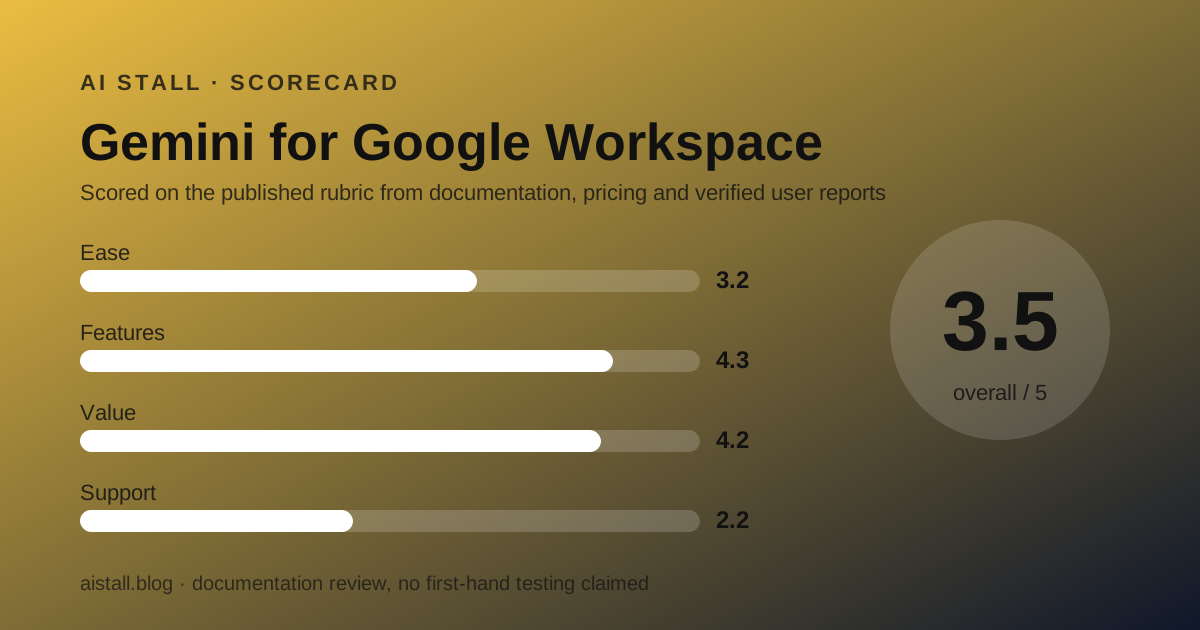
Scored on the published rubric, from documentation, pricing and verified user reports.
Best for: A small team already on Google Workspace that wants an assistant inside Gmail, Docs and Meet without a second subscription, and can live with usage limits published somewhere other than the price list.
Verdict
This is a documentation review built from the Google Workspace pricing page, the AI Expanded Access article in the Workspace admin help centre, the generative AI privacy hub and the public Trustpilot profile, all read on October 24, 2026. No subscription was bought for this page.
Google no longer sells a Gemini add-on as the way in. The assistant is listed as a plan feature in all four Business and Enterprise columns, starting at Business Starter at $7.00 per user per month.
That makes it the cheapest route to a work assistant in this category by a wide margin. It is also the one where the price list tells you least about what you are allowed to do.
The pricing page publishes exactly two AI numbers: audio overviews in Gemini Notebook, capped at 3 per day on Starter and 20 per day above it.
Every other limit lives in an admin help article about a paid add-on. That page is where you learn that Sheets AI functions run 5,000 a month, that Nano Banana Pro images run 30 a month, and that Workspace Studio limits begin being enforced on November 1, 2026.
The add-on that raises those ceilings is AI Expanded Access. Its price is not published. The page says pricing depends on your local currency and subscription length and sends you to a button.
So the grade splits. Value and features are strong because the assistant is genuinely in the seat. Ease of use is weak because the published numbers are in the wrong place.
Visit Gemini for Google Workspace
We have no affiliate relationship with this vendor. Link goes to the official site.
Where it is strong
- Gemini is a plan feature rather than an add-on. The pricing page lists it in all four Business and Enterprise columns, with Business Starter at $7.00 per user per month standard price, read October 24, 2026
- The cheapest paid tier that includes any assistant in this category: $7.00 per user per month standard, or $3.50 for the first 12 months on the first 20 users for new customers
- The usage limits, once found, are unusually specific: 5,000 Sheets AI function calls a month, 100 generated presentation slides a month, 500 seconds of generated video a month on Business Standard and Plus
- Gemini Notebook audio overviews are published on the price list itself: up to 3 per day on Business Starter and up to 20 per day on Standard, Plus and Enterprise
- The retention table in the privacy hub is itemised rather than summarised: Gemini Notebook prompts not retained after a session ends, Gemini app conversations auto-deleted at 3, 18 or 36 months with 18 as the default
- The training commitment is written in plain terms: content is not human reviewed or used for generative AI model training outside your domain without permission
- A 14 day no-cost trial is published on every self-serve tier
Where it falls short
- The AI Expanded Access add-on has no published price. The help page says pricing depends on your local currency and subscription length, that discounts may be available, and sends the reader to a button
- Almost no AI usage limit appears on the pricing page. The specific figures sit in an admin help article whose subject is a different product, the add-on
- Business Starter gets Gemini in Gmail and Vids but not in Docs, Sheets, Slides, Drive, Meet or Chat, per the feature matrix read October 24, 2026
- Two vendor pages use the word expanded for different levels: the pricing page calls Gemini Notebook on Business Standard Expanded access, while the help page calls that same level Higher level access and reserves Expanded for the paid add-on
- Three AI features are on promotional access with enforcement dates attached, including Workspace Studio, whose limits start being enforced on November 1, 2026
- The pricing page prints both all plans billed monthly and a separate annual option saving 16 percent with a one year commitment, without saying which cadence the displayed $7.00, $14.00 and $22 belong to
- Trustpilot shows workspace.google.com at 1.3 out of 5 from 165 reviews as of October 24, 2026, with 92 percent at one star, on an unclaimed profile
At a glance
| Pricing note | Included in Workspace from $7.00 per user per month standard price; the AI Expanded Access add-on has no published price (pricing page and admin help centre, October 24, 2026) |
|---|---|
| Business Starter | $7.00 per user per month standard, $3.50 for 12 months for new customers |
| Business Standard | $14.00 per user per month standard, $8.40 for 12 months for new customers |
| Business Plus | $22 per user per month, no introductory discount shown |
| Enterprise | Contact sales, no published price |
| AI add-on | AI Expanded Access, price not published |
| Add-on eligibility | Business Standard, Business Plus, Enterprise Standard, Enterprise Plus; not Business Starter |
| Trial | 14 days at no cost |
| Seat ceiling | 300 users on Starter, Standard and Plus; no stated limit on Enterprise |
| Intro offer scope | New customers only, first 20 users, 12 months |
| Sheets AI function limit | 5,000 a month on Standard and Plus, 25,000 with the add-on |
| Audio overviews | 3 per day on Starter, 20 per day above it |
| AI image limit | 5 a month on Starter, 30 on Standard and Plus, 300 with the add-on |
| Gemini app retention | 3, 18 or 36 months, admin set, 18 months default |
| Training | Not used for model training outside your domain without permission |
What Gemini for Google Workspace actually is
It is a plan feature, not a product with a price.
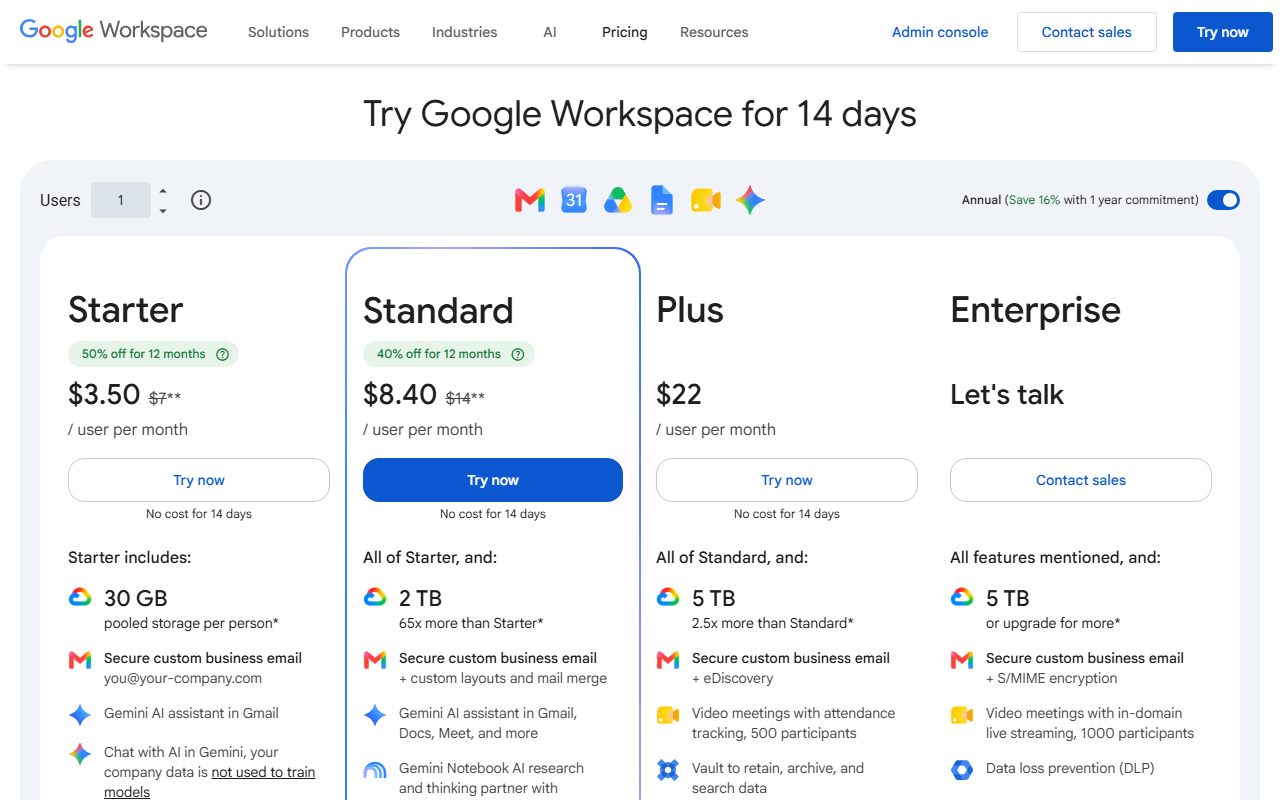
The pricing page read October 24, 2026 has no Gemini row with a dollar figure beside it. Gemini appears as a bullet on every card, starting with the Business Starter line about chatting with AI while your company data is not used to train models.
The feature matrix then splits it into four separate things. Gemini in Workspace apps, the Gemini app itself, Gemini Notebook, and Workspace Studio.
That split is the part a buyer has to learn. Gemini in Workspace apps is the side panel in Gmail, Docs and Meet. The Gemini app is the standalone chatbot. Gemini Notebook is a research tool. Workspace Studio builds agents.
All four are listed as included. Three of them have usage limits that are not on the page.
For the standalone assistant subscriptions this competes with, the shortlist is in the best AI assistant plans for small teams.
Who it is best for
The documentation points squarely at teams already on Workspace.
- A team whose email, calendar and documents are already on Google Workspace, where the assistant arrives with no new vendor
- A team that wants the cheapest paid tier in this category that includes an assistant at all
- A team on Business Standard or Plus, which is where the AI features stop being withheld
- An admin who needs a written retention schedule, since the privacy hub prints one per product
- A team whose AI work is drafting, summarising and asking questions of its own files rather than generating media
- Who should skip it: a team on Business Starter that wants AI in Docs, Sheets or Meet, none of which it gets
- Who should skip it: a team that generates images or video at volume, where the ceilings are low and the uplift is unpriced
How the pricing is structured, as of October 2026
Three published prices, one quote, and an unresolved billing cadence.
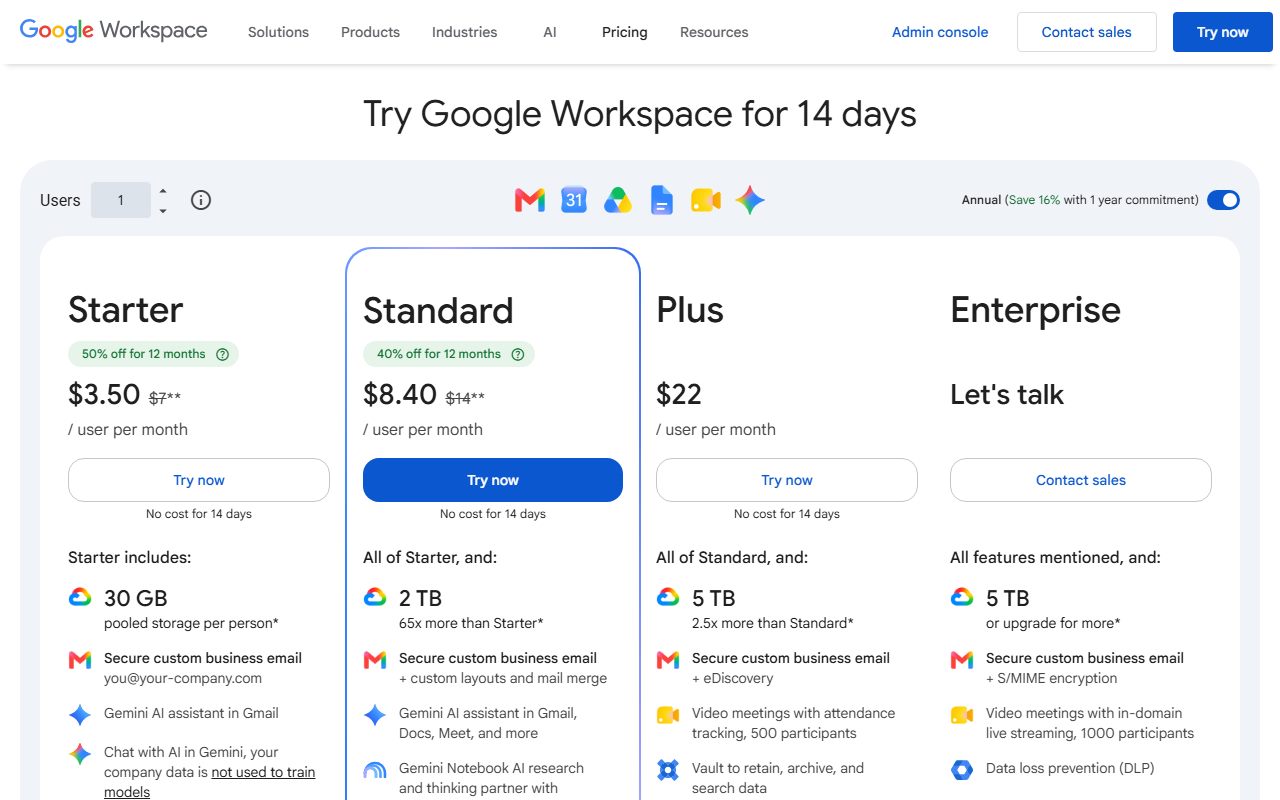
Business Starter is listed at $7.00 per user per month as the standard price, with $3.50 shown as 50 percent off for 12 months. Business Standard is $14.00 standard with $8.40 shown as 40 percent off.
Both discounts check out as multiplication: $7.00 halved is $3.50, and 60 percent of $14.00 is $8.40. Business Plus is $22 per user per month with no introductory discount shown. Enterprise says contact sales.
The page goes further than most and prints the dates. A price details panel read on October 24, 2026 showed the discounted rate running from November 7, 2026 to November 7, 2027, then the standard $7.00 for all users onwards.
The conditions are in the footnote. New Google Workspace customers only, the first 20 users added, 12 months, and a note that the actual price per user may vary by up to about 0.01 percent due to rounding.
One thing the page does not settle is cadence. It prints all plans billed monthly, all prices in US dollars, and separately offers an annual option described as saving 16 percent with a one year commitment.
Both strings are on the same page and neither explains which one the displayed figures belong to. This review prints both and leaves it there. The wider pattern is collected in our note on introductory pricing.
The AI limits are real, specific, and on the wrong page
This is the finding that sets the ease of use grade.
The pricing page publishes two AI numbers. Gemini Notebook audio overviews are capped at up to 3 per day on Business Starter and up to 20 per day on Standard, Plus and Enterprise.
There is also a row promising 5 times more notebooks, chat queries and sources per notebook above Starter. No base figure is given, so the multiple has nothing to multiply.
Everything else is in an admin help article titled AI Expanded Access, which exists to sell the add-on. Its comparison table has three columns: Business Starter, then Business Standard and Plus together with Enterprise Standard and Plus, then the add-on.
For Business Standard and Plus, read October 24, 2026, the published monthly allowances are 30 Docs writing-style matches, 30 Drive file organisations, 5,000 Sheets AI function calls, 100 spreadsheet builds, 60 canvases, 100 generated presentation slides and 30 Nano Banana Pro images.
Google Vids has its own set: 25 generated avatars, 500 seconds of generated video, 50 thirty-second music clips and 20 full music tracks a month.
Business Starter is marked no access on most of those rows. It gets 10 avatars, 200 seconds of video, 20 short music clips, 10 full tracks and 5 images a month.
These are the clearest AI allowances published by any vendor in this category. They are also on a page most buyers will never open, because its title names a product they have not bought.
Ease of use: what the 3.2 is built from
The product is easy. The paperwork is not.
On the good side, nothing has to be installed or connected. Gemini is in the side panel of apps the team already uses, and the free trial is 14 days on every self-serve tier.
The deductions are all about where the facts live. A buyer needs the pricing page for prices, the add-on help article for limits, and the privacy hub for retention. No single page carries all three.
Then there is a genuine naming collision between two of those pages. The pricing page labels Gemini Notebook on Business Standard as Expanded access. The help page labels that same level Higher level access and uses Expanded level access for the paid add-on.
So the word expanded means two different things depending on which Google page you are reading, and one of them is the name of a product.
Three features are also on promotional access rather than a stated limit: Meet speech translation, converting Slides to Vids with avatars until November 1, 2026, and Workspace Studio, whose limits enforcement begins on the same date.
A team planning agent work in Workspace Studio therefore has no allowance to plan against, only a date.
Features: what the 4.3 is built from
Breadth is the strongest column and it is broader than the price suggests.
Gemini in Workspace apps covers Gmail, Docs, Sheets, Slides, Vids, Drive, Meet and Chat on Business Standard and above. Starter gets Gmail and Vids only.
The standalone Gemini app is included on all four tiers for web and mobile chat, with skills customisation on all four, and access to what the page calls Google's most capable models for complex tasks withheld from Starter.
Gemini Notebook is listed on every tier, at basic access on Starter and expanded access above it, with the audio overview caps attached.
Workspace Studio, described as automating your workday with intelligent AI agents, is marked included on all four tiers with no limit stated and enforcement starting November 1, 2026.
Storage scales alongside: 30 GB pooled per person on Starter, 2 TB on Standard, 5 TB on Plus and Enterprise with more available on request.
What holds this at 4.3 rather than higher is tier gating rather than capability. The assistant is in the cheapest plan in name and in two apps in practice. The useful configuration starts at $14.00.
Value: what the 4.2 is built from
On price per included assistant, nothing here is close.
A competing suite charges separately. Microsoft 365 Copilot Business is listed as an add-on from $18.00 per user per month paid yearly, reduced from $21.00, on top of a qualifying plan.
Against that, Business Standard at $14.00 a user includes email, 2 TB of storage, Meet, the Gemini side panel across eight apps and the Gemini app.
The arithmetic for a ten-person team, by this desk, is $140 a month at the standard rate or $84 a month during the introductory year. The Copilot route is a Microsoft 365 subscription plus roughly $180 a month of add-on on top.
The deduction is the unpriced ceiling. A team that hits 30 images or 500 seconds of video a month has exactly one published option, and that option does not publish a price.
That is a real risk for a media-producing team and almost none at all for a team that writes email and spreadsheets. The grade reflects the second case, because that is who this site is written for.
For teams whose work is reasoning rather than filing, the standalone options are compared in ChatGPT Business versus Claude Team.
Support: what the 2.2 is built from
This is the weakest column of any product graded on this site so far.
The pricing page names support once, in the Enterprise column, as enhanced support for faster response times on critical issues. A footnote adds that a paid upgrade is available from Standard to Enhanced Support, or Enhanced to Premium on Enterprise plans.
No response time target appears for Business Starter, Standard or Plus. No channel is named for them either.
The public record is the worst in this category. Trustpilot shows workspace.google.com at 1.3 out of 5 from 165 reviews as of October 24, 2026, with 92 percent at one star and 4 percent at five.
That profile is unclaimed, which means nobody at the vendor is answering what is posted there.
Three cautions are due. 165 reviews is a tiny sample for a product this size, and the profile is filed under Google rather than Workspace, so it may collect complaints about other Google services.
The summary paragraph on that page is also labelled as created with AI, which makes it a machine reading of reviews rather than a human audit.
This page treats the number as a weak signal and not a measurement. What it does not dismiss is the structure: support quality is something you buy here, and the entry tiers do not buy any stated amount of it.
Limits and data handling stated by the vendor
Seats: Business Starter, Standard and Plus can be bought for a maximum of 300 users. Enterprise has no stated minimum or maximum.
Add-on eligibility: AI Expanded Access is available on Business Standard, Business Plus, Enterprise Standard and Enterprise Plus. Business Starter is not eligible.
Add-on billing: bought online, it is billed on the Flexible Plan. Removing a user's licence or deleting a licensed user mid-month may be charged for the full month.
Accounts that have never paid Google for anything may be required to make an early payment of $30 before buying the add-on at all.
The same page states that licences should not be assigned to users under 18.
Retention, per the privacy hub: Gemini in Workspace prompts and responses are kept 90 days to indefinite as determined by admins. Gemini app prompts are kept up to 36 months, with admins choosing 3, 18 or 36 and 18 as the default.
With conversation history off, new Gemini app chats are kept up to 72 hours. Gemini Notebook prompts and responses are not retained after the session ends.
Training: content is not human reviewed or otherwise used for generative AI model training outside your domain without permission, and none of your content is used for any other customer.
One geographic note on method. This page was read from Vietnam, where the site offers a region selector; the figures above are the ones the page itself labels as US dollars.
Alternatives
Notion AI. Bundled into the Notion Business plan at $20 per member per month on the yearly option, with 1,500 Standard and 500 Select credits per member a month and extra agent usage at $10 per 1,000 credits.
Choose Notion if your wiki and project tracker are the documents that matter. Otherwise choose Gemini, which is cheaper and sits in the apps where email and spreadsheets already live.
Microsoft 365 Copilot Business. An add-on from $18.00 per user per month paid yearly, reduced from $21.00, with a monthly rate of $25.20 and usage-based billing for some advanced AI features.
Choose Copilot if your team is in Word, Excel and Teams. Otherwise choose Gemini, which charges nothing extra for the assistant. The licence naming is mapped in our note on the Copilot rename.
A standalone chatbot. If the assistant does not need to see your files, a general subscription is simpler to price. See the ChatGPT Business review and the Claude Team review.
Bottom line
Gemini for Google Workspace is the cheapest real assistant in this category and the hardest one to plan a budget around.
From $7.00 a user a month, standard price, an assistant is already included. From $14.00 it is included in eight apps with allowances specific enough to audit.
What Google has not done is put those allowances on the page where people decide. They sit in an article about an add-on whose own price is not published.
For a ten-person team writing email, documents and spreadsheets, Business Standard at $140 a month is this category's value answer and the limits will never be felt.
For a team that generates media or wants to build agents in Workspace Studio, the honest advice is to get a figure for AI Expanded Access in writing before counting on it, because none exists in public.
The method behind these grades is in issue zero, and the rest of this category sits in AI assistants.
Buy it if
- Your email, documents and meetings are already on Google Workspace, because the assistant is already in the seat you pay for
- You want the cheapest paid tier in this category that includes any assistant, which is Business Starter at $7.00 per user per month standard
- Your AI use is drafting in Gmail, summarising Meet calls and asking questions of your own Drive, all of which are included on Business Standard
- You need a published retention schedule you can show someone, which the privacy hub prints as a table
Skip it if
- You need to know the price of the add-on before you commit, because AI Expanded Access does not publish one
- You are on Business Starter and want AI in Docs, Sheets or Meet, none of which are included at that tier
- You intend to generate images or video at volume, where the monthly caps are low enough to matter and the uplift costs an unpublished amount
- Your documents live in Notion or Microsoft 365, where a different bundled assistant already has the context
Frequently asked
Does Gemini cost extra on Google Workspace?
Not for the assistant itself. The pricing page read October 24, 2026 lists Gemini as a feature of all four Business and Enterprise columns, starting at Business Starter at $7.00 per user per month standard price. Higher usage limits require the AI Expanded Access add-on, which has no published price.
How much does AI Expanded Access cost?
The vendor does not print a figure. The admin help article says pricing depends on your local currency and the duration of your subscription, that discounts may be available, and that you should click a button to learn your specific pricing. This desk could not read a price on October 24, 2026.
Which Gemini features does Business Starter miss?
Gemini in Docs, Sheets, Slides, Drive, Meet and Chat are all marked unavailable on Business Starter in the feature matrix. Gemini in Gmail and Gemini in Vids are included. The help centre adds that Starter has no access at all to several Docs, Drive, Sheets and Slides AI actions.
What are the actual AI usage limits?
On Business Standard and Plus, per the add-on help page: 5,000 Sheets AI function calls a month, 100 generated presentation slides a month, 500 seconds of generated video a month, 30 Nano Banana Pro images a month, and 20 PDF audio overviews a day.
How much does Google Workspace cost for a 10-person team?
Business Standard at the standard $14.00 per user per month is $140 a month, which is this desk's multiplication. With the introductory 40 percent discount a new customer pays $8.40, or $84 a month, for 12 months on the first 20 users.
Does Google train its models on Workspace data?
The privacy hub states that content is not human reviewed or otherwise used for generative AI model training outside your domain without permission, and that none of your content is used for any other customer. The pricing page repeats the shorter version on the Starter card.
How long does Google keep Gemini prompts?
It depends which Gemini. The privacy hub table lists Gemini in Workspace prompts and responses at 90 days to indefinite as set by admins, Gemini app conversations at up to 36 months with 18 as the default, and Gemini Notebook prompts as not retained after the session ends.
Is there a free trial?
Yes, 14 days at no cost, published on each self-serve tier. The introductory discount is separate and larger: 50 percent off Business Starter or 40 percent off Business Standard for 12 months, for new customers only, on the first 20 users added.
Sources
- Google Workspace pricing page - checked October 24, 2026
- AI Expanded Access, Workspace admin help centre - checked October 24, 2026
- Generative AI in Google Workspace privacy hub - checked October 24, 2026
- Trustpilot profile for workspace.google.com - checked October 24, 2026
Update history
- October 24, 2026 - First published from the Google Workspace pricing page, the AI Expanded Access admin help article, the generative AI privacy hub and the Trustpilot profile, all read October 24, 2026. Records that the AI usage limits are published only on the add-on help page, that the add-on itself has no published price, and that two vendor pages use the word expanded for different levels of Gemini Notebook access.
Visit Gemini for Google Workspace
We have no affiliate relationship with this vendor. Link goes to the official site.